
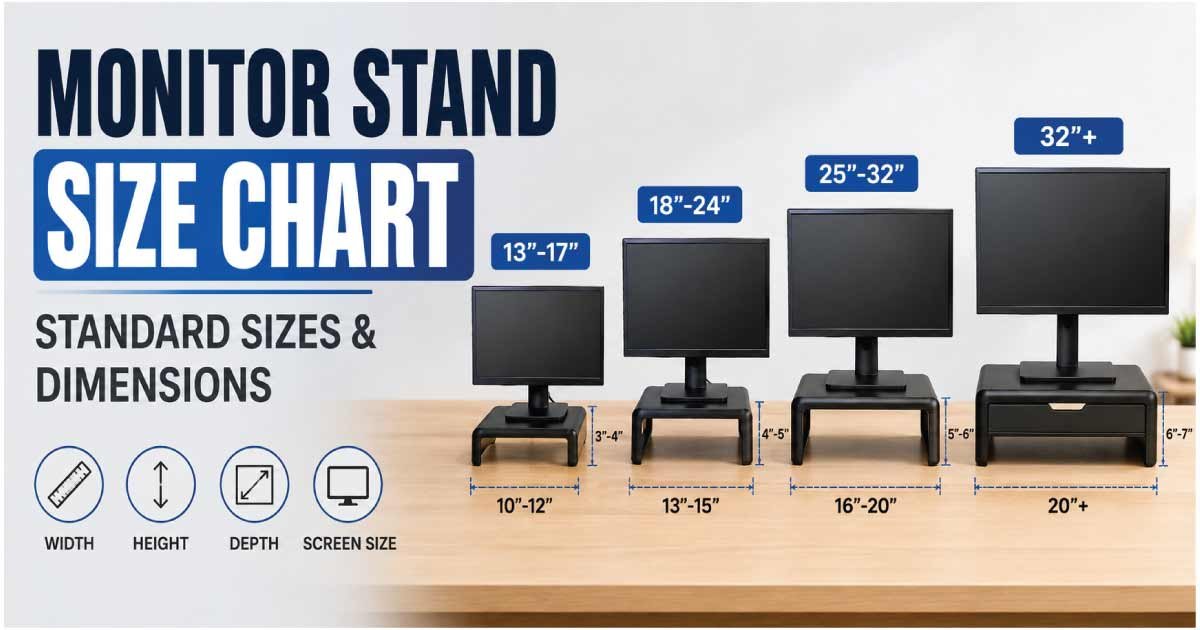
Choosing the right monitor stand size can improve your desk setup, viewing comfort, organization, and available workspace. A monitor stand does more than simply hold a screen above your desk. Its width, depth, height, weight capacity, and platform size all affect how well it works with your monitor and other desk accessories.
This monitor stand size chart provides a practical guide to common monitor stand dimensions, recommended monitor sizes, height ranges, weight capacities, and desk requirements. Whether you need a compact stand for a small desk, a wide riser for a large monitor, or an adjustable stand for an ergonomic workstation, understanding the available sizes makes choosing the right option easier.
Monitor stands come in several styles, including fixed risers, adjustable stands, dual-monitor stands, monitor arms, and desk shelves. The best choice depends on your monitor size, screen weight, desired viewing height, and available desk space.
Monitor Stand Size Chart
Monitor stands vary considerably in design, but the following chart provides useful general size ranges.
| Monitor Stand Size | Approx. Width | Approx. Depth | Height Range | Typical Monitor Size | Best For |
|---|---|---|---|---|---|
| Compact | 8–16 in | 6–10 in | 2–5 in | 19–24 in | Small desks |
| Small | 12–20 in | 8–12 in | 3–6 in | 21–27 in | Single monitors |
| Medium | 18–26 in | 9–14 in | 4–8 in | 24–32 in | Standard setups |
| Large | 24–36 in | 10–16 in | 5–10 in | 27–40 in | Large monitors |
| Extra Large | 32–48+ in | 12–18 in | 5–12 in | 34–49 in | Ultrawide displays |
| Dual Monitor | 24–48+ in | 8–16 in | Adjustable | 2 monitors | Multi-screen setups |
Dimensions are approximate and vary by stand style, manufacturer, materials, and adjustment mechanism.
The most important measurement is not simply the stand’s overall size. You should also check its weight capacity, platform dimensions, height, and compatibility with your monitor.
Monitor Stand Dimensions Explained
A monitor stand’s dimensions are usually described using width, depth, and height.
Monitor Stand Width
Width determines how much horizontal desk space the stand occupies.
A compact monitor stand may be less than 16 inches wide, while a large monitor riser or dual-monitor platform can extend beyond 30 inches.
When selecting a width, consider:
- Monitor base size
- Monitor screen width
- Keyboard position
- Desk accessories
- Speakers
- Available workspace
A stand does not necessarily need to be as wide as the monitor itself, provided the monitor’s base fits securely and the stand is rated to support its weight.
Monitor Stand Depth
Depth refers to how far the stand extends from the front toward the back of the desk.
A deeper platform can provide more stability and storage space, but it also consumes more desk area.
For small desks, a shallow monitor riser may be preferable.
Monitor Stand Height
Height determines how much the screen is raised above the desktop.
Fixed risers may provide only a few inches of elevation, while adjustable monitor stands and arms can provide significantly greater height adjustment.
The correct height should allow you to maintain a comfortable viewing position without repeatedly bending your neck upward or downward.
Monitor Stand Height Chart
Monitor height is especially important for an ergonomic desk setup.
| Stand Height | Approx. Screen Lift | Best Use |
|---|---|---|
| Low | 1–3 in | Slight elevation |
| Medium-Low | 3–5 in | General desk setups |
| Medium | 5–7 in | Standard ergonomic adjustment |
| High | 7–10 in | Taller users or low monitors |
| Adjustable | 2–12+ in | Flexible workstations |
These are general ranges. Your ideal monitor height depends on your body proportions, chair height, monitor size, and preferred viewing position.
A monitor should generally be positioned so that you can view the screen comfortably without prolonged neck flexion or extension.
What Size Monitor Stand Do I Need?
The correct monitor stand size depends on several factors.
Monitor Screen Size
Larger monitors usually have larger and heavier bases, although this varies considerably between models.
For a small 21–24-inch monitor, a compact or small stand may be sufficient.
For a 27–32-inch display, a medium or large stand may provide better stability and usable surface area.
Ultrawide monitors may require a wider platform or a monitor arm designed specifically for the display’s weight and VESA configuration.
Monitor Weight
Weight capacity is more important than screen size alone.
Two 32-inch monitors can have very different weights depending on their construction and stand design.
Always compare your monitor’s weight with the stand’s maximum supported weight.
Monitor Base Size
If you are placing the monitor on a riser, measure the monitor’s existing base.
The base must sit securely on the platform without excessive overhang.
Monitor Stand Size by Monitor Size
The following chart offers a convenient starting point.
| Monitor Size | Suggested Stand Width | Suggested Stand Depth | Recommended Stand Type |
|---|---|---|---|
| 19–22 in | 10–18 in | 7–10 in | Compact |
| 23–24 in | 12–20 in | 8–12 in | Small |
| 25–27 in | 16–24 in | 9–13 in | Small/Medium |
| 28–32 in | 20–28 in | 10–15 in | Medium/Large |
| 34–38 in Ultrawide | 24–36 in | 10–16 in | Large/Arm |
| 40–43 in | 28–40 in | 12–18 in | Large |
| 45–49 in Ultrawide | 32–48+ in | 12–20 in | Extra Large/Arm |
These dimensions are guidelines rather than strict requirements. Always compare the stand’s platform size with the monitor base and check the manufacturer’s weight rating.
Monitor Stand Size for Different Desk Types
Your desk dimensions can influence the best stand size.
Small Desk
If your desk is around 36–48 inches wide, a compact or medium monitor stand may be preferable.
Avoid unnecessarily wide platforms that reduce the space available for your keyboard, mouse, speakers, and other accessories.
A monitor arm can be especially useful because it moves the monitor’s footprint away from the desktop.
Standard Desk
A desk around 48–60 inches wide provides more flexibility.
A medium or large monitor stand can work well for a single monitor, while a wider stand or dual-monitor arm can accommodate multiple screens.
Large Desk
A desk wider than 60 inches provides more room for larger stands, multiple monitors, and accessories.
However, you should still select a stand based on monitor requirements rather than filling available space simply because it is there.
Monitor Riser vs. Monitor Stand
The terms monitor stand and monitor riser are sometimes used interchangeably, but they can describe different designs.
A monitor riser usually refers to a platform that elevates the monitor while creating storage space underneath.
A traditional monitor stand may support the monitor on a vertical base or adjustable column.
| Feature | Monitor Riser | Adjustable Monitor Stand |
|---|---|---|
| Elevates monitor | Yes | Yes |
| Height adjustment | Limited | Usually available |
| Under-monitor storage | Often | Varies |
| Desk footprint | Moderate | Moderate |
| Ergonomic flexibility | Low–Moderate | High |
| Best for | Simple setups | Adjustable workstations |
A riser is useful when you need a simple height increase, while an adjustable stand is better when you want precise positioning.
Monitor Stand Size for Dual Monitors
Dual-monitor setups require additional planning.
A dual-monitor stand may support two screens side by side or use an elevated arm system.
Dual Monitor Stand Width
For two monitors, consider the combined width of the displays.
Two 24-inch monitors placed side by side can require significantly more horizontal space than a single 24-inch screen.
A dual-monitor arm can help reduce the amount of desk surface occupied by monitor bases.
Dual Monitor Stand Weight Capacity
Check the maximum weight per arm as well as the total supported weight.
If the two monitors have different weights, make sure each arm can support its assigned display.
Dual Monitor Stand Height
An adjustable dual-monitor stand can make it easier to align both screens at the same eye level.
This can create a cleaner and more comfortable multi-monitor workstation.
Monitor Stand Size for Ultrawide Monitors
Ultrawide monitors require special consideration because their screens can be considerably wider than traditional displays.
Common ultrawide sizes include:
- 29 inches
- 34 inches
- 38 inches
- 40 inches
- 45 inches
- 49 inches
A wide monitor does not necessarily require a stand that matches the entire width of the screen. What matters is whether the monitor’s base or mounting system is properly supported.
For large ultrawide displays, check:
- Maximum supported weight
- VESA compatibility
- Base dimensions
- Arm reach
- Height adjustment
- Desk-clamp requirements
For particularly large monitors, a heavy-duty monitor arm can sometimes provide more flexibility than a traditional riser.
VESA Mounting and Monitor Stand Size
If you are using a monitor arm or VESA-compatible stand, screen size alone is not enough.
VESA refers to a standardized mounting-hole pattern used by many monitors.
Common patterns include:
- 75 × 75 mm
- 100 × 100 mm
- Larger patterns on some displays
Before buying a VESA monitor stand, check the mounting pattern on your monitor.
Also verify the stand’s supported weight range.
A monitor may technically have a compatible VESA pattern but still be too heavy for a particular stand or arm.
Discover More:
How High Should a Monitor Stand Be?
There is no single stand height that works for everyone.
Your ideal height depends on your:
- Body height
- Chair height
- Desk height
- Monitor size
- Viewing distance
- Sitting posture
A useful starting point is to position the monitor so that your eyes are approximately level with the upper portion of the display when sitting in your normal working position.
The goal is to avoid prolonged upward or downward neck positioning.
If you frequently switch between sitting and standing, an adjustable monitor arm or height-adjustable stand can provide greater flexibility.
How to Measure for a Monitor Stand
Measure your setup before buying.
Step 1: Measure the Monitor Base
If you plan to keep the original monitor stand, measure its width and depth.
The entire base should fit securely on the new riser.
Step 2: Measure Your Desk
Record the available:
- Width
- Depth
- Height
- Clearance around the monitor
Step 3: Measure Desired Screen Height
Sit in your normal working position and determine how much higher you want the monitor.
A temporary stack of books can help you estimate the desired elevation, although it should not be used as a permanent unstable monitor support.
Step 4: Check Weight
Find your monitor’s weight without accessories that will not be supported by the stand.
Compare this figure with the stand’s maximum load rating.
Step 5: Check VESA Compatibility
If using a mounting arm or VESA stand, confirm that your monitor’s mounting pattern is compatible.
Monitor Stand Weight Capacity
Weight capacity is a critical safety consideration.
| Stand Type | Typical Weight Capacity | Common Use |
|---|---|---|
| Basic Riser | 15–30 lb | Small monitors |
| Medium Stand | 20–40 lb | Standard monitors |
| Heavy-Duty Stand | 30–50+ lb | Large displays |
| Single Monitor Arm | 10–35+ lb | Adjustable setups |
| Dual Monitor Arm | 20–50+ lb total | Two monitors |
These figures are general examples rather than universal standards. Always use the manufacturer’s stated weight rating.
Do not assume that a wide or heavy-looking stand can support any monitor.
Best Monitor Stand Size for Gaming
Gaming monitors can be larger and heavier than basic office displays.
A medium or large monitor stand may be suitable for many gaming setups, particularly with 27–32-inch displays.
For gaming setups, also consider:
- Monitor refresh rate does not directly determine stand size.
- Screen weight is more important.
- Ultrawide monitors may require wider or stronger support.
- Adjustable arms can improve positioning.
- Dual-monitor gaming setups require additional width.
- Cable management can affect the usable desk area.
If your gaming monitor has a large factory stand, a monitor arm can sometimes free significant desk space.
Discover More:
Best Monitor Stand Size for Office Work
For office work, comfort and adjustability are often more important than having the largest stand.
A compact or medium stand can work well with a 21–27-inch display.
If you spend many hours at the computer, prioritize:
- Height adjustment
- Stable support
- Comfortable viewing angle
- Proper monitor distance
- Easy screen positioning
- Adequate desk space
An adjustable monitor arm can be particularly useful when multiple people use the same workstation.
Benefits of the Right Monitor Stand Size
Choosing an appropriately sized monitor stand can provide several advantages.
Better Desk Organization
A monitor riser can create storage space underneath the display for:
- Keyboard
- Notebook
- Documents
- Small accessories
- Controllers
Improved Viewing Position
Raising the monitor can help position the screen at a more comfortable height.
More Usable Desk Space
A monitor arm can remove the original monitor base from the desk surface entirely.
Better Stability
A properly sized stand reduces the risk of an oversized monitor extending beyond the support area.
Common Monitor Stand Sizing Mistakes
Choosing Based Only on Monitor Size
A 27-inch monitor can have a very different weight and base design from another 27-inch monitor.
Check the actual specifications.
Ignoring Weight Capacity
Never exceed the stand’s rated maximum load.
Forgetting Desk Depth
A large riser can consume valuable front-to-back desk space.
Blocking the Keyboard
A stand that is too deep may leave insufficient room for comfortable keyboard placement.
Ignoring VESA Compatibility
A VESA-mounted stand must match both the mounting pattern and weight requirements of the monitor.
Forgetting Cable Space
Leave room for power and display cables. Some monitor stands include cable-management channels that can make the setup cleaner.
Discover More:
Frequently Asked Questions About Monitor Stand Sizes
What size monitor stand do I need?
Choose a stand based on your monitor’s weight, base dimensions, desired height, and desk space. A compact stand can work for small monitors, while 27–32-inch displays often benefit from medium or large stands.
How wide should a monitor stand be?
The stand should be wide and deep enough to support the monitor base securely. It does not necessarily need to be as wide as the screen. Check the monitor base dimensions and the stand’s recommended load capacity.
What height should a monitor stand be?
The ideal height depends on your sitting position and monitor size. A common ergonomic starting point is to position the monitor so your eyes are near the upper portion of the display while sitting naturally.
What size monitor stand is best for a 27-inch monitor?
A 16–24-inch-wide stand can be a practical starting range for many 27-inch monitors, but the monitor’s base dimensions and weight should determine the final choice.
What size monitor stand is best for a 32-inch monitor?
A medium or large stand with approximately 20–28 inches of width and adequate depth can work well for many 32-inch monitors. Always check the actual monitor base and weight.
Can a monitor stand hold a larger monitor?
It can if the stand’s platform and weight rating support the monitor safely. Screen size alone does not determine compatibility.
Are monitor arms better than monitor stands?
Monitor arms can provide greater height, tilt, swivel, and positioning flexibility while freeing desk space. Traditional stands and risers are often simpler and easier to install.
How much weight can a monitor stand hold?
Weight capacity varies by design. Basic risers may support around 15–30 pounds, while heavy-duty stands and arms can support considerably more. Always follow the manufacturer’s stated maximum load.
Does monitor size determine stand size?
Not completely. Monitor size is useful as a starting point, but weight, base dimensions, VESA mounting pattern, desired height, and desk space are more important when determining compatibility.
Conclusion
Choosing the right monitor stand size requires more than matching a stand to your monitor’s screen size. You should consider the monitor’s actual weight, base dimensions, desired viewing height, VESA compatibility, desk width, and available depth.
Compact stands work well for small monitors and limited desks, while medium and large stands are better suited to larger displays. Dual-monitor and ultrawide setups may benefit from wide platforms or adjustable monitor arms that provide stronger support and greater positioning flexibility.
Before purchasing, measure your monitor base, desk space, desired height, and monitor weight. If you are using a VESA-mounted stand or arm, verify the mounting pattern and weight capacity as well.
Use this monitor stand size chart as a practical starting point, but always check the exact specifications of both your monitor and the stand. The best monitor stand is one that provides stable support, comfortable positioning, and enough desk space for your complete workstation.
