
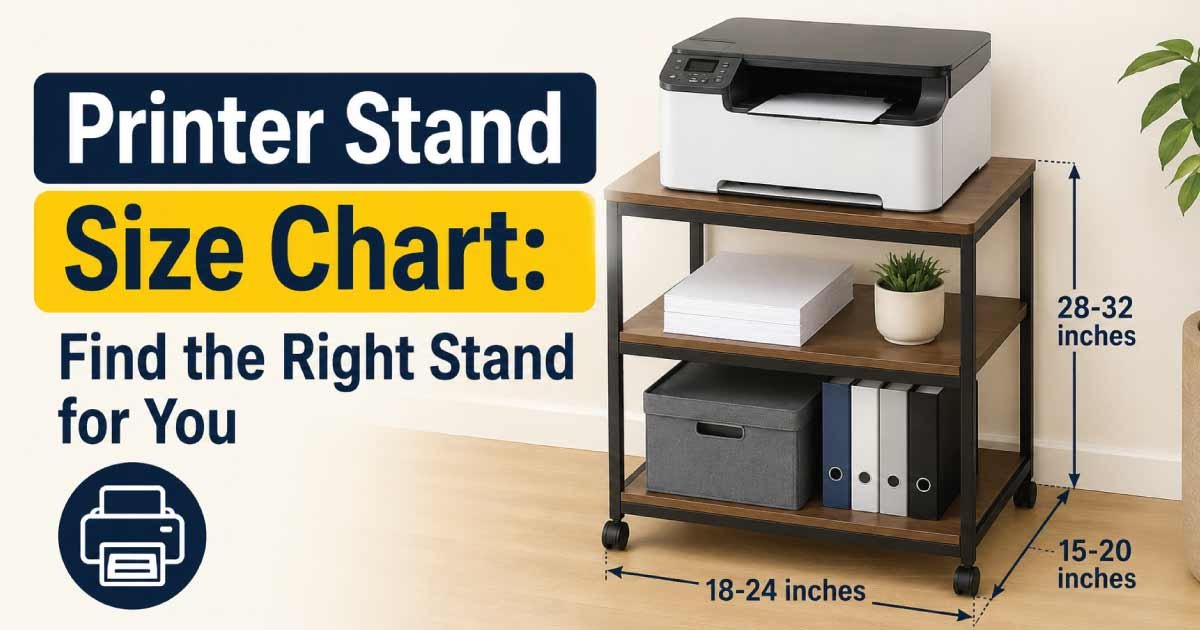
Choosing the right printer stand size can make your workspace more organized, comfortable, and efficient. A printer may look compact on its own, but the stand needs enough surface area to support the printer securely while providing space for paper, ink, cables, and other supplies.
Printer stands are available in many widths, depths, and heights. Small stands are designed for compact home printers, while larger units can support multifunction printers, office copiers, paper trays, and additional equipment.
This printer stand size chart explains common printer stand dimensions, recommended sizes for different printer types, ideal stand heights, weight capacity, storage requirements, and how to choose the right stand for your home or office.
Printer Stand Size Chart
The ideal printer stand dimensions depend on the printer’s physical size and the amount of storage you need.
| Printer Stand Type | Approx. Width | Approx. Depth | Approx. Height | Best For |
|---|---|---|---|---|
| Compact | 16–20 in. | 12–16 in. | 20–28 in. | Small home printers |
| Small | 18–24 in. | 14–18 in. | 24–30 in. | Inkjet and compact laser printers |
| Medium | 22–28 in. | 16–22 in. | 26–32 in. | Standard office printers |
| Large | 26–34 in. | 20–26 in. | 28–36 in. | Multifunction printers |
| Extra Large | 30–40+ in. | 24–32+ in. | 28–40 in. | Large office equipment |
Dimensions are general planning ranges. Actual printer stand sizes vary by design and manufacturer.
What Is a Printer Stand?
A printer stand is a dedicated piece of furniture designed to hold a printer at a convenient and stable height.
Depending on the design, a printer stand may also include:
- Shelves
- Drawers
- Cabinets
- Paper storage
- Supply compartments
- Cable management
- Adjustable shelves
- Lockable storage
Some printer stands are simple tables, while others resemble small filing cabinets or office storage units.
Why Printer Stand Size Matters
The correct stand size can help:
- Keep the printer stable
- Protect the printer from accidental falls
- Provide convenient access
- Organize printer supplies
- Reduce desk clutter
- Improve workspace efficiency
- Create additional storage
The stand should be large enough to support the printer without making the printer hang significantly over the edges.
Printer Stand Dimensions Explained
Three primary measurements determine the physical size of a printer stand:
- Width
- Depth
- Height
Each measurement serves a different purpose.
Printer Stand Width
Width is the horizontal measurement from one side of the stand to the other.
The stand should generally be wider than the printer so that the printer has a stable base.
A little extra width can also provide room for paper trays, accessories, or other small supplies.
Printer Stand Depth
Depth measures how far the stand extends from front to back.
The stand should be deep enough to support the entire printer base.
This is particularly important for printers with rear paper feeders or large output trays.
Printer Stand Height
Height determines how easy the printer is to access.
A printer stand that is too low may require bending repeatedly, while a stand that is too high can make it difficult to reach the printer’s controls or paper tray.
Printer Stand Size by Printer Type
Different printer types require different amounts of support space.
| Printer Type | Typical Printer Size | Recommended Stand Width | Recommended Stand Depth |
|---|---|---|---|
| Compact Inkjet | 14–18 in. wide | 16–22 in. | 14–18 in. |
| Standard Inkjet | 16–20 in. wide | 18–24 in. | 16–20 in. |
| Compact Laser | 15–20 in. wide | 18–24 in. | 16–21 in. |
| Standard Laser | 18–24 in. wide | 22–28 in. | 18–24 in. |
| Multifunction Printer | 20–30+ in. wide | 24–34 in. | 20–28 in. |
| Large Office Printer | 28–40+ in. wide | 32–44+ in. | 24–34+ in. |
Always measure the actual printer before selecting the stand because printer dimensions vary considerably.
How to Measure a Printer for a Stand
Accurate measurements are the easiest way to choose the correct printer stand.
Measure Printer Width
Measure from the widest point on the left side to the widest point on the right side.
Include any permanently attached components that affect the printer’s footprint.
Measure Printer Depth
Measure from the front-most point to the back-most point.
If the printer has a rear paper feeder, consider its operating space as well.
Measure Printer Height
Measure from the bottom of the printer to its highest point.
If the scanner lid opens upward, allow additional clearance above the printer.
How Much Bigger Should a Printer Stand Be?
A printer stand should generally provide enough surface area for the printer to sit securely without the printer extending excessively beyond the stand.
For example, if your printer is approximately 18 inches wide and 16 inches deep, a stand around 20–22 inches wide and 18–20 inches deep can provide a more comfortable base.
Additional space is useful for:
- Paper
- Printer accessories
- Cable connections
- Paper trays
- Small storage containers
Avoid choosing a stand that is barely larger than the printer’s footprint.
Printer Stand Height Chart
The ideal height depends on where the printer is being used and how frequently you access it.
| Stand Height | Best For | Typical Use |
|---|---|---|
| 18–24 in. | Low storage | Printer with frequent bending acceptable |
| 24–28 in. | General use | Home office |
| 28–32 in. | Convenient access | Standing or seated work areas |
| 32–36 in. | Higher placement | Easy standing access |
| 36+ in. | Specialized setup | Certain office arrangements |
For many home offices, a stand around 24–32 inches high can provide a practical balance between storage and accessibility.
Printer Stand Size for a Home Office
Home offices often have limited floor space, making compact printer stands especially useful.
A small or medium printer stand can provide dedicated printer storage without occupying too much room.
Recommended Home Office Size
For a standard home printer, consider approximately:
- 18–24 inches wide
- 14–20 inches deep
- 24–30 inches high
If you need drawers or cabinets for printer supplies, choose a slightly wider or deeper unit.
Printer Stand Size for a Small Space
When floor space is limited, focus on the stand’s footprint.
A compact printer stand around 16–20 inches wide and 12–16 inches deep may work well for smaller printers.
Small-Space Features to Consider
Look for:
- Narrow construction
- Vertical storage
- Shelves
- Wheels
- Compact drawers
- Cable openings
- Lightweight construction
A vertical printer stand can provide additional storage without requiring a large floor footprint.
Printer Stand Size for a Large Office Printer
Large multifunction printers require substantially more support.
Before buying a stand, measure:
- Printer body
- Paper trays
- Output tray
- Scanner lid
- Side-access panels
- Rear connections
- Paper-loading area
A larger stand may need to be 30–40 inches wide or more, depending on the printer.
Weight capacity becomes particularly important for large office printers.
Printer Stand Weight Capacity
The stand’s weight capacity should be greater than the printer’s actual weight.
For example, if your printer weighs 60 pounds, selecting a stand rated for only 60 pounds leaves little margin for paper and supplies.
A stronger stand can provide additional stability.
| Printer Category | Typical Weight Range | Suggested Stand Capacity |
|---|---|---|
| Compact Inkjet | 10–25 lb | 30+ lb |
| Standard Inkjet | 15–35 lb | 40+ lb |
| Compact Laser | 20–45 lb | 50+ lb |
| Standard Laser | 30–70 lb | 80+ lb |
| Multifunction | 50–120+ lb | 130+ lb |
| Large Office Printer | 100+ lb | Based on manufacturer requirements |
Weight ranges are general and can vary significantly between printer models.
Printer Stand With Storage Size
Many people choose a printer stand because it provides storage as well as a printer surface.
Storage can be useful for keeping:
- Printer paper
- Envelopes
- Ink cartridges
- Toner
- Labels
- USB cables
- Cleaning supplies
- Office stationery
Printer Stand With Drawers
Drawers are useful for smaller supplies.
A stand with one or two drawers can keep frequently used items organized without requiring additional furniture.
Printer Stand With Cabinets
Cabinets provide enclosed storage for larger supplies and can help keep the workspace visually tidy.
A cabinet-style printer stand generally requires more floor space than a simple table.
Printer Stand Shelf Size
If you plan to store paper underneath the printer, pay attention to shelf dimensions.
A shelf should be:
- Wide enough for standard paper storage
- Deep enough for paper trays
- Strong enough for the intended load
- Easy to access
Adjustable shelves can be especially useful because they allow you to customize the storage area.
Printer Stand on Wheels
A printer stand with casters can be convenient when you occasionally need to move the printer.
Wheels are useful for:
- Cleaning behind the stand
- Reorganizing an office
- Moving equipment
- Accessing cables
- Flexible workspace layouts
However, the wheels should lock securely when the printer is being used.
A heavy printer should not be placed on a poorly constructed rolling stand.
Discover More:
Printer Stand Size for Different Paper Types
The type of paper you use can influence storage requirements.
Common paper sizes include:
- Letter
- Legal
- A4
- Envelopes
- Specialty photo paper
- Cardstock
If you store paper beneath the printer, make sure the shelf or drawer can accommodate the paper size without bending or crushing it.
How Much Clearance Does a Printer Need?
A printer stand should not only support the printer but also allow the printer to operate properly.
Leave enough room for:
- Paper loading
- Printed pages
- Opening covers
- Changing cartridges
- Connecting cables
- Ventilation
- Maintenance
A printer may fit physically on a stand but still be inconvenient if there isn’t enough operating clearance.
Front Clearance
Allow enough space for printed pages to exit and for paper trays to open.
Rear Clearance
Leave room for power cables and other connections.
Top Clearance
If the printer has a scanner lid or top-loading paper tray, make sure the lid can open fully.
Printer Stand vs. Desk
A printer can be placed on a desk, but a dedicated stand has several advantages.
| Feature | Printer Stand | Desk |
|---|---|---|
| Printer Storage | Excellent | Limited |
| Paper Storage | Often included | Usually separate |
| Floor Space | Uses floor space | Uses desk space |
| Workspace | Frees desk area | Reduces work area |
| Mobility | Some models have wheels | Usually stationary |
| Organization | High | Moderate |
A dedicated printer stand can be especially useful when desk space is needed for a computer, monitor, keyboard, documents, and other equipment.
Discover More:
How to Choose the Right Printer Stand Size
Use a simple measurement process before buying.
Step 1: Measure the Printer
Record its width, depth, and height.
Step 2: Measure the Available Space
Check the available floor or desk area where the stand will go.
Step 3: Add Extra Surface Space
Allow additional room around the printer for comfortable operation.
Step 4: Check Weight Capacity
Make sure the stand can safely support the printer and any items stored on it.
Step 5: Consider Storage
Decide whether you need shelves, drawers, cabinets, or open storage.
Step 6: Check Clearance
Make sure paper trays, scanner lids, and access panels can open properly.
Step 7: Consider Mobility
If the printer needs to be moved occasionally, a locking-wheel design may be useful.
Common Printer Stand Size Mistakes
Choosing a Stand That Is Too Small
A stand that barely fits the printer may provide insufficient stability.
Ignoring Printer Trays
Paper trays may extend beyond the printer body when opened.
Make sure the stand and surrounding space can accommodate them.
Forgetting Printer Weight
Large laser and multifunction printers can be considerably heavier than small inkjet models.
Always check the stand’s weight rating.
Ignoring Cable Space
Power and data cables need room behind or beside the printer.
Choosing Based Only on Width
Width is important, but depth and height are equally important.
Forgetting Storage Requirements
If you need paper, toner, or ink storage, a basic tabletop stand may not provide enough room.
Discover More:
Printer Stand Size Buying Checklist
Before purchasing, check the following:
- Printer width
- Printer depth
- Printer height
- Printer weight
- Stand width
- Stand depth
- Stand height
- Weight capacity
- Paper tray clearance
- Scanner lid clearance
- Cable clearance
- Storage requirements
- Shelf dimensions
- Drawer size
- Wheel quality
- Locking casters
- Available floor space
Frequently Asked Questions About Printer Stand Sizes
What is the standard size of a printer stand?
There is no single standard printer stand size. Many home-office stands are approximately 18–28 inches wide, 14–22 inches deep, and 24–32 inches high, while larger office models can be considerably bigger.
How big should a printer stand be?
The stand should be slightly larger than the printer’s footprint and strong enough to support its weight. Additional space is useful for paper trays, cables, supplies, and printer operation.
What size printer stand do I need for a home printer?
For many home printers, a stand around 18–24 inches wide and 14–20 inches deep can provide a practical starting point. Measure your specific printer before purchasing.
How high should a printer stand be?
A printer stand between 24 and 32 inches high can work well for many home-office setups. The ideal height depends on whether you use the printer while sitting or standing and how frequently you access it.
Should a printer stand be wider than the printer?
Yes. A little additional width can provide better stability and space around the printer. It can also make it easier to access controls, paper, and cables.
Can a printer stand hold a heavy laser printer?
It can if the stand has an appropriate weight rating. Heavy laser and multifunction printers require a strong, stable stand designed to support their weight.
Is a printer stand with wheels a good idea?
A printer stand with locking wheels can be useful when you need to move the printer for cleaning or office rearrangement. Make sure the casters lock securely and can support the printer’s weight.
How much space should I leave around a printer?
Leave enough room for paper loading, printed pages, cable connections, ventilation, and maintenance. Additional clearance may be required for scanner lids and access panels.
Can I use a regular table as a printer stand?
Yes, provided the table is stable, appropriately sized, and strong enough to support the printer. A dedicated printer stand may offer better storage and organization.
What is the best printer stand size for a small office?
A medium stand around 22–28 inches wide and 16–22 inches deep can work well for many standard office printers. Larger multifunction printers may require a bigger unit.
Final Thoughts on Printer Stand Sizes
The best printer stand size depends on the printer’s dimensions, weight, operating clearance, and the amount of storage you need. For a compact home printer, a small stand around 16–24 inches wide may be sufficient. Standard office printers generally benefit from a medium stand, while multifunction and large office printers require larger and stronger support.
Don’t choose a stand based on width alone. Measure the printer’s width, depth, and height, then consider paper trays, scanner lids, cables, and other areas that need clearance.
If storage is important, choose a stand with shelves, drawers, or cabinets. If you regularly move your equipment, a wheeled model with locking casters can provide additional flexibility.
The right printer stand should provide a stable surface, appropriate weight capacity, comfortable access, adequate clearance, and useful storage. By comparing your printer’s measurements with this printer stand size chart, you can choose a setup that keeps your workspace organized while making everyday printing more convenient.
