
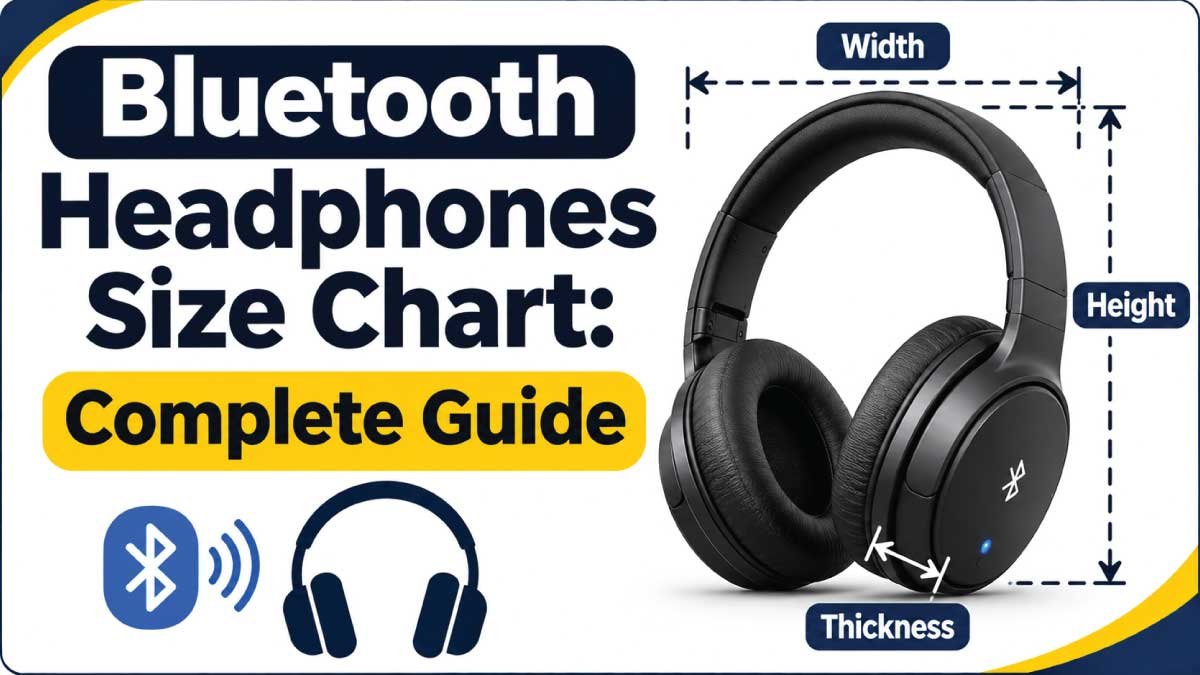
Choosing the right Bluetooth headphones involves more than comparing sound quality, battery life, and wireless features. Size and fit are equally important because they directly affect comfort, stability, and the overall listening experience. Headphones that are too tight may create pressure around the ears, while oversized designs may feel loose and move during everyday activities.
A Bluetooth headphones size chart helps you understand different headphone dimensions, ear cup measurements, headband adjustments, and available designs. Whether you are purchasing over-ear headphones, on-ear headphones, or a compact wireless model, understanding these measurements can help you find a comfortable option.
This complete guide explains Bluetooth headphone sizes, how to measure your head, how to compare different designs, and what to consider before purchasing your next pair.
Affiliate Disclosure: This article contains Amazon affiliate links. As an Amazon Associate, we earn from qualifying purchases. If you purchase through these links, it won’t cost you anything extra.
Understanding Bluetooth Headphones Sizes
Bluetooth headphones are available in different shapes and sizes to accommodate various head shapes, ear dimensions, and listening preferences. Unlike earbuds, which fit inside the ear canal, traditional headphones sit over or around the ears.
Their overall fit depends on several components, including the headband, ear cups, padding, and adjustment mechanism.
What Determines Bluetooth Headphone Size?
Several measurements influence how Bluetooth headphones fit.
- Headband length: Determines how far the headphones can extend to accommodate different head sizes.
- Ear cup diameter: Measures the width or height of the ear cup opening.
- Ear cup depth: Determines how much space is available between the ear and the headphone housing.
- Headband width: Influences how comfortably the headphones rest on the top of the head.
- Cushion thickness: Affects pressure distribution and the distance between the ear and the speaker.
- Overall weight: Influences comfort during extended listening sessions.
Understanding these components helps you compare different headphone models more accurately.
Are Bluetooth Headphones Available in Standard Sizes?
Most Bluetooth headphones do not follow a universal size chart. Manufacturers generally design their products with adjustable headbands and different ear cup dimensions.
Common product descriptions include:
- Small: Compact designs that may suit smaller heads.
- Medium: General-purpose designs with moderate adjustment ranges.
- Large: Larger headbands and ear cups designed for additional space.
- One Size Fits Most: Adjustable headphones intended to accommodate a broad range of users.
These labels are general descriptions rather than standardized measurements. Always check the manufacturer’s dimensions before purchasing.
Bluetooth Headphones Size Chart
The following chart provides approximate reference categories for comparing common Bluetooth headphone dimensions. These ranges are illustrative rather than universal specifications because individual models have different construction and adjustment systems.
| Headphone Measurement | General Size Category | Approximate Dimension |
|---|---|---|
| Headband Circumference | Small | 50–54 cm |
| Headband Circumference | Medium | 55–58 cm |
| Headband Circumference | Large | 59–62 cm |
| Ear Cup Outer Diameter | Compact | 65–75 mm |
| Ear Cup Outer Diameter | Standard | 75–90 mm |
| Ear Cup Outer Diameter | Large | 90–105 mm |
| Ear Cushion Thickness | Slim | 15–20 mm |
| Ear Cushion Thickness | Standard | 20–30 mm |
| Ear Cushion Thickness | Thick | 30–40 mm |
These measurements are general comparison references, not official Bluetooth headphone sizing standards. Headband circumference also does not directly represent the maximum supported head circumference of every model.
How to Read the Bluetooth Headphones Size Chart
When comparing headphones, consider the following measurements:
- Headband circumference: Helps you understand the general head size range.
- Ear cup diameter: Indicates the amount of space available around the ears.
- Cushion thickness: Helps determine how far the ear cups extend from the head.
- Adjustment range: Shows how much the headband can extend or contract.
A headphone with larger ear cups is not automatically more comfortable. The shape, padding, clamping force, and positioning also influence the fit.
Why Headphone Dimensions Matter
Correct dimensions can improve comfort and help prevent common fitting problems.
For example, ear cups that are too small may press directly against the ears. Similarly, a headband with insufficient adjustment may create pressure around the top of the head.
The ideal headphone should sit securely without squeezing the head or requiring frequent repositioning.
Bluetooth Headphone Types and Their Sizes
Bluetooth headphones are available in several designs. Each type has different dimensions, wearing positions, and comfort characteristics.
1. Over-Ear Bluetooth Headphones
<escape></escape>
Over-ear headphones feature large ear cups designed to surround the ears completely.
Their main characteristics include:
- Larger ear cups.
- Cushioned padding around the ears.
- Adjustable headbands.
- Different ear cup depths.
- Suitable designs for extended listening.
These headphones are commonly used for music, gaming, office work, and travel.
The ear cups should provide enough space to accommodate the entire ear without excessive pressure.
2. On-Ear Bluetooth Headphones
On-ear headphones use smaller ear cups that rest directly against the outer ears rather than surrounding them.
Their characteristics include:
- Compact ear cup dimensions.
- Lighter construction in many models.
- Smaller storage requirements.
- Direct contact between cushions and ears.
On-ear headphones may be suitable for people who prefer compact wireless headphones. However, cushion pressure is especially important because the ear cups rest directly against the ears.
3. Over-Ear Noise-Cancelling Headphones
Noise-cancelling Bluetooth headphones are available in different over-ear sizes.
They typically include additional electronic components, microphones, and battery systems.
Important fitting considerations include:
- Sufficient ear cup depth.
- Comfortable cushion thickness.
- Balanced headband pressure.
- A suitable seal around the ears.
The noise-cancelling performance depends on the headphone design and technology, not simply on the size of the ear cups.
4. Gaming Bluetooth Headphones
Wireless gaming headphones often feature larger ear cups, padded headbands, and integrated microphones.
Their main characteristics include:
- Larger housing structures.
- Comfortable ear cushions.
- Adjustable headbands.
- Microphone attachments.
- Additional controls and electronic components.
Because gaming sessions can last several hours, weight and pressure distribution are important selection factors.
5. Foldable Bluetooth Headphones
Foldable headphones are designed to reduce storage space when not in use.
Their ear cups and headband may include hinges or rotating mechanisms.
Consider the following features:
- Folded dimensions.
- Unfolded headband length.
- Ear cup size.
- Hinge durability.
- Carrying case compatibility.
Foldability improves portability, but it does not automatically indicate a smaller wearing size.
How to Measure Your Head for Bluetooth Headphones
Measuring your head can help you understand whether a particular headphone design is likely to fit comfortably.
Although most Bluetooth headphones have adjustable headbands, checking your measurements can be useful when comparing products.
Step 1: Measure Your Head Circumference
Use a flexible measuring tape to measure around your head.
Position the tape:
- Slightly above your eyebrows.
- Around the widest part of your head.
- Above your ears.
- Around the back of your head.
Keep the tape comfortably positioned without pulling it too tightly.
Record the measurement in centimeters.
Step 2: Measure Your Ear Dimensions
For over-ear headphones, ear dimensions are important.
Measure the approximate height and width of your outer ear using a ruler held outside the ear.
Do not insert measuring tools into your ear.
Compare these measurements with the internal ear cup opening rather than only the outside dimensions of the headphone housing.
Step 3: Check Headband Adjustment
Headphone manufacturers may provide minimum and maximum headband extension measurements.
Check whether the headband offers sufficient adjustment for your head circumference.
A headband that is too short may create uncomfortable pressure, while excessive extension may make the headphones unstable.
Step 4: Evaluate Ear Cup Depth
Ear cup depth determines how much room is available between your ears and the internal headphone surface.
Consider the following:
- Your ears should not be pressed uncomfortably against the speaker housing.
- Cushions should sit comfortably around or against the ears, depending on the design.
- The headphones should not require excessive adjustment to maintain their position.
How to Choose the Correct Bluetooth Headphones Size
Selecting the right Bluetooth headphone size requires considering more than head circumference. Ear dimensions, cushion materials, weight, and intended use are also important.
1. Consider Your Head Shape
People have different head shapes and proportions. Two users with identical head circumference measurements may experience different headphone fits.
Some headphones have narrow headbands, while others use wider structures that distribute pressure across a larger area.
Look for adjustable models that provide sufficient flexibility.
2. Choose the Right Ear Cup Size
Ear cup dimensions are especially important when purchasing over-ear headphones.
| Ear Cup Size | General Characteristics | Suitable Preference |
|---|---|---|
| Compact | Smaller opening | Users preferring a compact design |
| Standard | Moderate opening | General listening |
| Large | Wider and taller opening | Users requiring additional ear space |
| Extra Large | Particularly spacious design | Users needing greater clearance |
These categories are descriptive rather than standardized size classifications.
3. Check Cushion Material
Headphone cushions are available in different materials.
| Cushion Material | Main Characteristics | General Advantages |
|---|---|---|
| Memory Foam | Compressible and flexible | Adapts to contact pressure |
| Synthetic Leather | Smooth outer surface | Easy surface cleaning |
| Fabric | Breathable construction | Different ventilation characteristics |
| Velour | Soft textile surface | Comfortable fabric contact |
The best material depends on personal preference, climate, and intended listening duration.
4. Consider Headphone Weight
Weight can influence how headphones feel during extended use.
Heavier models may create more pressure around the head, especially when their headband padding is limited.
When comparing products, check the manufacturer’s weight specifications and consider how the weight is distributed.
5. Think About Your Intended Use
Different activities require different headphone characteristics.
- Office work: Prioritize comfortable padding and adjustable headbands.
- Travel: Consider foldable designs and compact carrying cases.
- Gaming: Look for spacious ear cups and suitable headband support.
- Exercise: Consider lightweight designs intended for movement.
- Music listening: Prioritize a comfortable fit and your preferred sound characteristics.
Best Bluetooth Headphones

Check Price on Amazon
Signs That Your Bluetooth Headphones Are the Wrong Size
An unsuitable headphone fit can make listening uncomfortable and reduce stability.
Recognizing the warning signs can help you identify whether you need a different model.
Signs Your Headphones Are Too Small
- The headband does not extend sufficiently.
- The ear cups press tightly against your ears.
- The cushions create uncomfortable pressure.
- The headphones feel restrictive around your head.
- You experience discomfort after wearing them for a short period.
Signs Your Headphones Are Too Large
- The ear cups move during normal activities.
- The headband does not remain securely positioned.
- The headphones slide down when you move.
- The ear cushions do not maintain their intended position.
- You need frequent adjustments.
How to Fix Headphone Sizing Problems
Try these practical solutions:
- Adjust the headband evenly on both sides.
- Reposition the ear cups around your ears.
- Check whether the cushions are correctly attached.
- Consider replacement cushions with compatible dimensions.
- Look for a model with a different adjustment range.
- Choose a different headphone design if the current one remains uncomfortable.
Do not force the headband beyond its intended adjustment range.
Also Read:
Bluetooth Headphones Size Comparison: On-Ear vs Over-Ear
On-ear and over-ear headphones differ mainly in how their ear cups contact the ears.
Understanding these differences can help you choose a design that matches your comfort preferences.
| Feature | On-Ear Headphones | Over-Ear Headphones |
|---|---|---|
| Ear Cup Size | Generally smaller | Generally larger |
| Wearing Position | Rests on ears | Surrounds ears |
| Ear Contact | Direct cushion contact | Cushion around ears |
| Portability | Often compact | Often larger |
| Cushion Pressure | Directly against ears | Around outer ears |
| Storage | Usually easier | Depends on design |
| Common Use | Everyday listening | Music, work, travel |
Which Design Should You Choose?
Choose on-ear headphones if you prefer a compact design and do not mind the cushions resting directly against your ears.
Choose over-ear headphones if you prefer ear cups that surround your ears and provide more internal space.
Neither design is automatically better for everyone. The right choice depends on ear dimensions, head shape, cushion design, and personal comfort.
Also Read:
Common Bluetooth Headphone Sizing Mistakes
Even when headphone manufacturers provide detailed product dimensions, users sometimes misunderstand the measurements or overlook important fitting factors.
1. Choosing Headphones Based Only on Headband Size
Head circumference is useful, but it does not tell you everything about headphone fit.
Ear cup width, height, depth, and cushion design are equally important.
2. Ignoring Ear Cup Opening Dimensions
Large external ear cups do not necessarily have large internal openings.
Always compare the internal opening dimensions when purchasing over-ear headphones.
3. Overlooking Headphone Weight
A headphone may have suitable dimensions but still feel uncomfortable because of its weight.
Check the weight specifications, particularly if you intend to wear the headphones for extended periods.
4. Assuming One Size Fits Everyone
Adjustable headphones accommodate different users, but adjustment ranges are not unlimited.
People with particularly small or large heads may need to compare several models before finding a suitable fit.
5. Ignoring Cushion Thickness
Cushion thickness affects how the headphones sit against your head and how much space is available around your ears.
Thin cushions may allow your ears to contact the internal housing, while thicker cushions may change the positioning of the ear cups.
6. Confusing External and Internal Dimensions
External ear cup measurements include the outer housing, while internal measurements describe the available space for your ears.
These are different specifications and should not be treated as interchangeable.
Also Read:
How to Maintain and Replace Bluetooth Headphone Cushions
Headphone cushions can gradually wear out because of regular use, moisture, friction, and natural material deterioration.
Proper maintenance helps preserve comfort and keep your headphones in good condition.
Cleaning Headphone Cushions
Follow the manufacturer’s cleaning recommendations.
For removable cushions:
- Detach the cushions carefully if the manufacturer allows it.
- Use a suitable cleaning method for the material.
- Avoid soaking electronic components.
- Allow the cushions to dry completely.
- Reattach them securely before using the headphones.
Different materials require different cleaning methods, so always check the product instructions.
When Should You Replace Headphone Cushions?
Consider replacement when:
- The cushion material starts peeling.
- Foam loses its original shape.
- The surface becomes cracked or damaged.
- The cushions become permanently flattened.
- The headphones no longer feel comfortable.
Replacement cushions should match the headphone model and attachment mechanism.
Can Replacement Cushions Improve Headphone Fit?
Yes, compatible replacement cushions may improve comfort when the original padding has deteriorated.
However, changing cushion thickness can alter the distance between the ears and speaker drivers. It may also change the overall fit and acoustic characteristics.
Choose replacement cushions designed for your specific model.
Frequently Asked Questions About Bluetooth Headphone Sizes
1. What Is the Standard Size of Bluetooth Headphones?
There is no universal standard size for Bluetooth headphones. Most models use adjustable headbands, while ear cup dimensions and cushion thickness vary by manufacturer and design.
2. How Do I Know What Size Bluetooth Headphones I Need?
Measure your head circumference, check your ear dimensions, and compare them with the manufacturer’s specifications. Also consider headband adjustment, ear cup opening, and cushion depth.
3. Are Bluetooth Headphones One Size Fits All?
Many Bluetooth headphones feature adjustable headbands intended to accommodate a range of head sizes. However, adjustment ranges and ear cup dimensions differ, so one model may not fit everyone comfortably.
4. What Is the Difference Between On-Ear and Over-Ear Headphones?
On-ear headphones rest directly against the outer ears, while over-ear headphones surround the ears with larger cushions. Over-ear models generally provide more space around the ears, but comfort depends on their dimensions and construction.
5. Are Larger Ear Cups More Comfortable?
Not necessarily. Larger ear cups may provide additional room, but their shape, depth, cushion material, and positioning also influence comfort. The best option depends on your ear dimensions.
6. How Tight Should Bluetooth Headphones Fit?
Bluetooth headphones should remain securely positioned without creating excessive pressure. They should not slide easily, but they should also not squeeze your head or ears.
7. Can I Replace Bluetooth Headphone Cushions?
Many Bluetooth headphones have replaceable cushions. However, some models use integrated or specialized attachments. Check manufacturer compatibility before purchasing replacements.
8. Why Do My Bluetooth Headphones Hurt My Ears?
Discomfort may result from small ear cups, excessive clamping force, insufficient cushion depth, or unsuitable padding. Try adjusting the headband or consider a model with different dimensions.
9. How Do I Measure Bluetooth Headphone Ear Cups?
Measure the internal width and height of the ear cup opening, rather than only the external housing. For over-ear designs, compare these measurements with the height and width of your outer ears.
10. Are Lightweight Bluetooth Headphones Better for Long Listening Sessions?
Lightweight headphones may reduce the weight carried on your head, but weight alone does not determine comfort. Headband padding, clamping force, ear cup dimensions, and cushion materials also matter.
Conclusion
Choosing the correct Bluetooth headphones size is essential for comfortable listening and a secure fit. Headband adjustment, ear cup dimensions, cushion thickness, and overall weight all influence how headphones feel during everyday use.
Use the Bluetooth headphones size chart as a general reference when comparing different models. Measure your head, check the internal ear cup dimensions, and consider your preferred headphone design before making a purchase.
The best Bluetooth headphones are those that accommodate your head and ears comfortably without excessive pressure or frequent adjustments. Taking time to compare these measurements can help you find a suitable pair for work, travel, entertainment, and everyday listening.
