
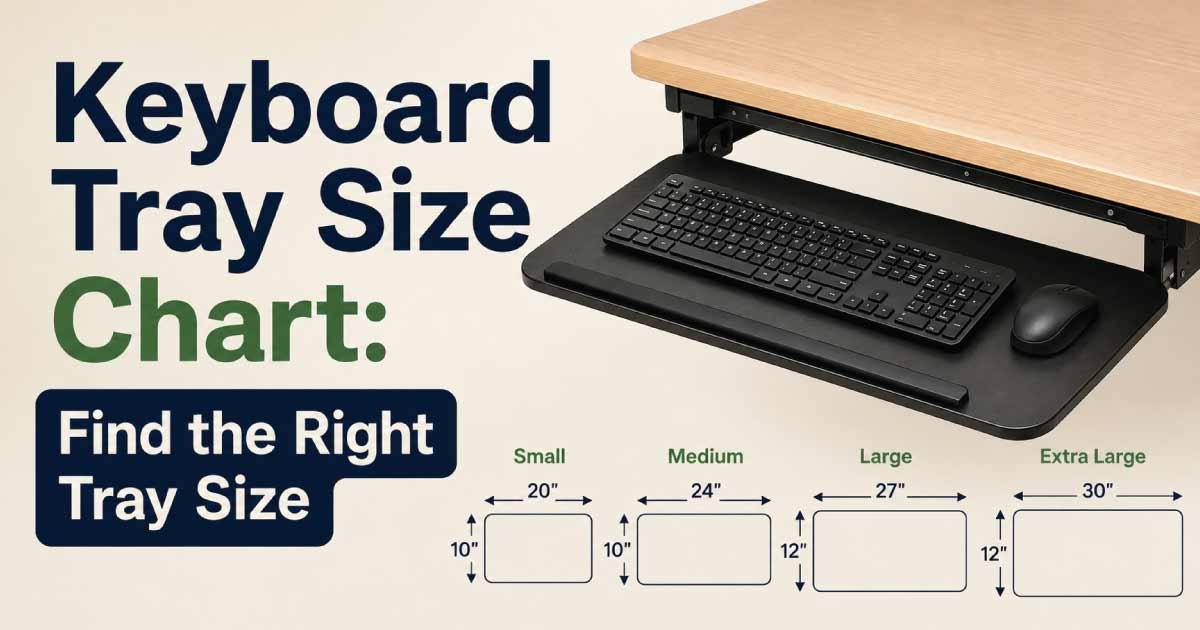
Choosing the right keyboard tray size can improve your desk setup, typing comfort, and available workspace. A keyboard tray needs enough room for the keyboard and mouse while fitting securely underneath or beside your desk.
Keyboard trays come in different widths, depths, mounting styles, and height ranges. Some are compact platforms designed for a keyboard only, while larger trays provide dedicated mouse space and adjustable positioning.
This keyboard tray size chart explains standard keyboard tray dimensions, recommended sizes for different keyboards, mounting requirements, height considerations, and how to choose the right tray for your workstation.
Keyboard Tray Size Chart
Keyboard tray dimensions vary according to the keyboard type and whether the tray includes a separate mouse area.
| Keyboard Tray Type | Approx. Width | Approx. Depth | Typical Use |
|---|---|---|---|
| Compact | 20–24 in. | 9–11 in. | Small keyboards |
| Standard | 24–28 in. | 10–12 in. | Full-size keyboards |
| Wide | 28–32 in. | 11–14 in. | Keyboard + mouse |
| Extra Wide | 32–36+ in. | 12–16 in. | Large setups |
| Ergonomic | 24–32 in. | 11–15 in. | Adjustable workstations |
Dimensions are approximate and vary by tray design, mounting system, and included accessories.
What Is a Keyboard Tray?
A keyboard tray is a platform designed to hold a computer keyboard below or near the main surface of a desk.
Most keyboard trays attach underneath a desk using a mounting bracket or sliding rail system.
A keyboard tray can help:
- Free up desktop space
- Position the keyboard at a comfortable height
- Keep the keyboard closer to the user
- Improve workstation organization
- Create more room for paperwork
- Support an ergonomic typing position
Some trays are fixed, while others can slide, tilt, rotate, or adjust vertically.
Why Keyboard Tray Size Matters
The correct keyboard tray size should provide enough space for your keyboard, mouse, and normal hand movement.
A tray that is too narrow can make the keyboard feel cramped. A tray that is too shallow may not provide enough wrist space.
The right dimensions also need to work with your desk.
Before buying, consider:
- Keyboard width
- Keyboard depth
- Mouse size
- Mouse movement
- Desk thickness
- Available legroom
- Mounting space
- Desired adjustment range
Standard Keyboard Tray Dimensions
A typical keyboard tray for a full-size keyboard is often approximately 24–28 inches wide and 10–12 inches deep.
However, the exact dimensions depend on the design.
Keyboard Tray Width
Width is measured from the left side of the tray to the right side.
The tray should be wider than the keyboard, leaving enough space for comfortable positioning.
For a full-size keyboard, a tray around 24–28 inches wide can provide a practical amount of room.
Keyboard Tray Depth
Depth measures the distance from the front edge to the rear edge.
A keyboard tray should have enough depth to support the keyboard while leaving room for comfortable hand positioning.
A depth of approximately 10–12 inches works for many standard setups.
Keyboard Tray Size by Keyboard Type
Different keyboards require different amounts of space.
| Keyboard Type | Approx. Keyboard Width | Approx. Keyboard Depth | Recommended Tray Width |
|---|---|---|---|
| 60% Keyboard | 11–13 in. | 4–6 in. | 16–20 in. |
| 65% Keyboard | 12–14 in. | 4–6 in. | 17–21 in. |
| 75% Keyboard | 12–14 in. | 5–7 in. | 18–22 in. |
| Tenkeyless | 13–15 in. | 5–7 in. | 20–24 in. |
| Full-Size | 17–19 in. | 6–8 in. | 24–28 in. |
| Ergonomic/Split | 20–30+ in. | 8–12 in. | 28–36+ in. |
Keyboard dimensions vary by manufacturer and design.
Keyboard Tray Size for Mouse Use
If you plan to use the mouse on the same tray, additional width becomes important.
A keyboard may fit comfortably on a 20-inch tray, but adding a mouse can make the setup cramped.
Keyboard-Only Tray
A keyboard-only tray can be relatively narrow.
A width of around 20–24 inches may be enough for many compact or standard keyboards.
Keyboard and Mouse Tray
For a keyboard and mouse combination, consider a tray approximately 24–32 inches wide.
A larger tray allows you to position the mouse without forcing it too close to the keyboard.
Extended Mouse Platform
Some trays include a separate mouse platform that extends to the side.
This design can be useful when under-desk space is limited.
Keyboard Tray Depth Chart
Depth is often overlooked when selecting a tray.
| Tray Depth | Best For |
|---|---|
| 8–9 in. | Compact keyboards |
| 9–10 in. | Small keyboard setups |
| 10–12 in. | Standard keyboards |
| 12–14 in. | Keyboard + mouse |
| 14–16+ in. | Ergonomic and extended setups |
A deeper tray isn’t always better. It should provide useful workspace without reducing legroom.
Keyboard Tray Height
Keyboard height affects typing posture and overall comfort.
The tray should position the keyboard so your arms can remain relaxed while typing.
Adjustable Keyboard Trays
Adjustable trays can move:
- Up
- Down
- Forward
- Backward
- Side to side
- At an angle
This flexibility can be helpful when several people use the same workstation.
Fixed Keyboard Trays
Fixed trays are simpler and generally less expensive.
They can work well when the desk and user have a consistent setup.
Keyboard Tray Clearance Under a Desk
Before installing a keyboard tray, check the space underneath the desk.
Measure:
- Desk thickness
- Distance from desk edge to leg supports
- Available knee space
- Distance between drawers and desk supports
- Available mounting area
A tray may physically fit beneath a desk but still interfere with drawers, cabinets, or your knees.
Keyboard Tray Mounting Space
Most under-desk keyboard trays require a sufficiently strong mounting surface.
Before installation, determine:
- Where the mounting brackets will attach
- Whether the desk surface is thick enough
- Whether screws can be installed safely
- Whether the desk has a solid underside
- Whether cables or electronics are underneath
Avoid mounting a tray where screws could damage wiring or other equipment.
Keyboard Tray Mounting Styles
Keyboard trays are commonly available in several mounting configurations.
Under-Desk Sliding Tray
This style slides underneath the desk when not being used.
Advantages include:
- Saves desktop space
- Easy access
- Clean appearance
- Good for compact workstations
Pull-Out Keyboard Tray
A pull-out tray uses rails that allow the platform to move forward and backward.
This can provide flexible positioning during use.
Clamp-On Keyboard Tray
Clamp-on designs attach to the desk without permanent screw installation.
They can be useful for renters or temporary workstations.
Adjustable Ergonomic Tray
These trays usually provide multiple adjustment points.
They are designed for users who want more control over keyboard position.
Keyboard Tray Size for Gaming Keyboards
Gaming keyboards can be wider than standard keyboards, especially when they include a number pad, media controls, or additional keys.
A tray around 26–32 inches wide can provide more comfortable space for a gaming keyboard and mouse.
Gaming Setup Considerations
Consider:
- Keyboard width
- Mouse pad size
- Mouse movement
- Cable routing
- Wrist support
- Desk clearance
If you use a large mouse pad, a standard keyboard tray may not provide enough surface area.
Keyboard Tray Size for Ergonomic Keyboards
Ergonomic and split keyboards can require significantly more space.
Some ergonomic keyboards have unusual shapes or separate left and right sections.
A wider tray can provide better positioning flexibility.
For larger ergonomic setups, consider a tray approximately 28–36 inches wide with 12–16 inches of depth, depending on the keyboard design.
Measure the complete keyboard setup rather than relying on general keyboard categories.
Discover More:
Keyboard Tray Size for Small Desks
A keyboard tray can be particularly useful with a small desk because it moves the keyboard below the main desktop.
For compact desks, consider:
- 20–24 inch tray width
- 9–11 inch depth
- Sliding design
- Compact mounting brackets
- Low-profile construction
Make sure the tray does not reduce available legroom.
Keyboard Tray and Desk Height
Desk height and keyboard tray height work together.
A desk may be comfortable for your monitor and paperwork but too high for typing directly on its surface.
An under-desk keyboard tray can lower the keyboard position.
Why Keyboard Position Matters
A comfortable keyboard position can help you maintain:
- Relaxed shoulders
- Comfortable elbows
- Neutral wrists
- Proper forearm positioning
- A natural typing posture
An adjustable tray makes it easier to customize the position.
How to Measure for a Keyboard Tray
Accurate measurements can prevent installation problems.
Step 1: Measure Your Keyboard
Measure the keyboard’s:
- Width
- Depth
- Height
Include wrist rests or attached accessories if they will remain on the tray.
Step 2: Measure Your Mouse Setup
If the mouse will share the tray, determine how much additional width you need.
Step 3: Measure the Desk
Record:
- Desk width
- Desk depth
- Desk thickness
- Underside clearance
Step 4: Check Legroom
Sit at the desk and determine how much space is available beneath it.
Step 5: Check Mounting Space
Make sure there is enough solid material underneath the desk for secure installation.
How Much Bigger Should a Keyboard Tray Be Than the Keyboard?
A keyboard tray should generally provide some extra room around the keyboard.
For example, if your keyboard is approximately 18 inches wide, choosing a tray around 24–26 inches wide can provide additional room for positioning and possibly a mouse.
For compact keyboards, a smaller tray may be sufficient.
The goal is not to maximize tray size but to provide comfortable usable space.
Discover More:
Keyboard Tray Size vs. Desk Size
The keyboard tray does not need to match the width of the desk.
A small desk can accommodate a relatively wide keyboard tray if there is enough underside clearance.
However, the tray should not extend beyond the practical boundaries of the desk in a way that interferes with movement or surrounding furniture.
Small Desk
A compact tray around 20–24 inches wide may work well.
Medium Desk
A 24–28 inch tray provides more flexibility.
Large Desk
A 28–36 inch tray can accommodate larger keyboards and mouse setups.
Common Keyboard Tray Size Mistakes
Choosing a Tray That Is Too Narrow
A narrow tray may fit the keyboard but leave no useful room for the mouse.
Ignoring Tray Depth
A keyboard may technically fit while leaving inadequate room for wrist positioning.
Forgetting Desk Thickness
Mounting hardware must be compatible with the desk structure.
Ignoring Legroom
A tray that is positioned too low or too far forward can interfere with your knees.
Not Measuring the Keyboard
Keyboard sizes vary significantly. Always measure your actual keyboard.
Ignoring Mouse Space
If you use the mouse frequently, plan the tray around your entire input setup rather than the keyboard alone.
How to Choose the Right Keyboard Tray Size
Follow these simple steps:
- Measure the keyboard.
- Measure the mouse and mouse pad if they will share the tray.
- Choose a tray with additional usable space.
- Measure the underside of your desk.
- Check desk thickness for mounting compatibility.
- Make sure the tray won’t interfere with drawers or legs.
- Consider whether you need height or tilt adjustment.
- Choose a material and mounting system that can support your equipment.
Discover More:
Keyboard Tray Size Buying Checklist
Before purchasing a keyboard tray, check:
- Keyboard width
- Keyboard depth
- Keyboard height
- Mouse size
- Mouse pad size
- Tray width
- Tray depth
- Desk thickness
- Under-desk clearance
- Legroom
- Mounting space
- Adjustment range
- Weight capacity
- Sliding mechanism
- Cable clearance
- Wrist support requirements
Frequently Asked Questions About Keyboard Tray Sizes
What is the standard size of a keyboard tray?
A standard keyboard tray is commonly around 24–28 inches wide and 10–12 inches deep. The exact dimensions vary depending on whether the tray is designed for a keyboard only or for a keyboard and mouse.
How wide should a keyboard tray be?
For a full-size keyboard, a tray around 24–28 inches wide can provide comfortable space. If you want to keep the mouse on the same tray, consider a wider model around 28–32 inches.
How deep should a keyboard tray be?
A depth of approximately 10–12 inches works well for many standard keyboards. Compact keyboards may require less depth, while ergonomic setups and keyboard-plus-mouse configurations may benefit from 12–16 inches.
Will a keyboard tray fit under any desk?
Not necessarily. The desk needs sufficient underside clearance and a suitable mounting surface. Drawers, support rails, cabinets, and other structures can interfere with installation.
What size keyboard tray do I need for a gaming keyboard?
A 26–32 inch wide tray can work well for many gaming keyboards, particularly when you also need room for a mouse. Large gaming setups may require additional width.
**Can a keyboard tray hold a mouse?
Yes, many larger keyboard trays are designed to hold both a keyboard and mouse. If you use a large mouse pad, make sure the tray has enough width and depth for the complete setup.
Is a wider keyboard tray better?
A wider tray provides more usable space, but it is not always better. The tray should match your keyboard and mouse setup while preserving legroom and fitting properly beneath the desk.
What is the best keyboard tray size for a small desk?
A compact tray around 20–24 inches wide and 9–11 inches deep can work well for small desks. Measure the underside of the desk before purchasing to make sure the tray can be installed safely.
**How high should a keyboard tray be?
The keyboard should be positioned so your shoulders remain relaxed and your wrists stay relatively neutral while typing. Adjustable trays are useful because the ideal position varies with the user and desk height.
Are clamp-on keyboard trays better than screw-mounted trays?
Neither is universally better. Clamp-on trays are convenient when you don’t want to drill into the desk, while screw-mounted trays can provide a more permanent installation when the desk has a suitable mounting surface.
Final Thoughts on Keyboard Tray Sizes
The right keyboard tray size should provide enough room for your keyboard while fitting comfortably beneath your desk. For many full-size keyboards, a 24–28 inch wide and 10–12 inch deep tray is a useful starting point. Compact keyboards can work with smaller trays, while gaming and ergonomic setups may require wider platforms.
Remember that the keyboard itself is only part of the equation. If you want to use a mouse on the tray, you need additional surface area. Ergonomic keyboards may also require considerably more width and depth than conventional designs.
Before buying, measure your keyboard, mouse, desk thickness, underside clearance, and available legroom. Also consider whether you want a fixed, sliding, clamp-on, or adjustable tray.
A properly sized keyboard tray can free valuable desktop space and create a more comfortable typing position. Instead of choosing the largest tray available, select one that matches your equipment, workstation, and everyday needs.
