
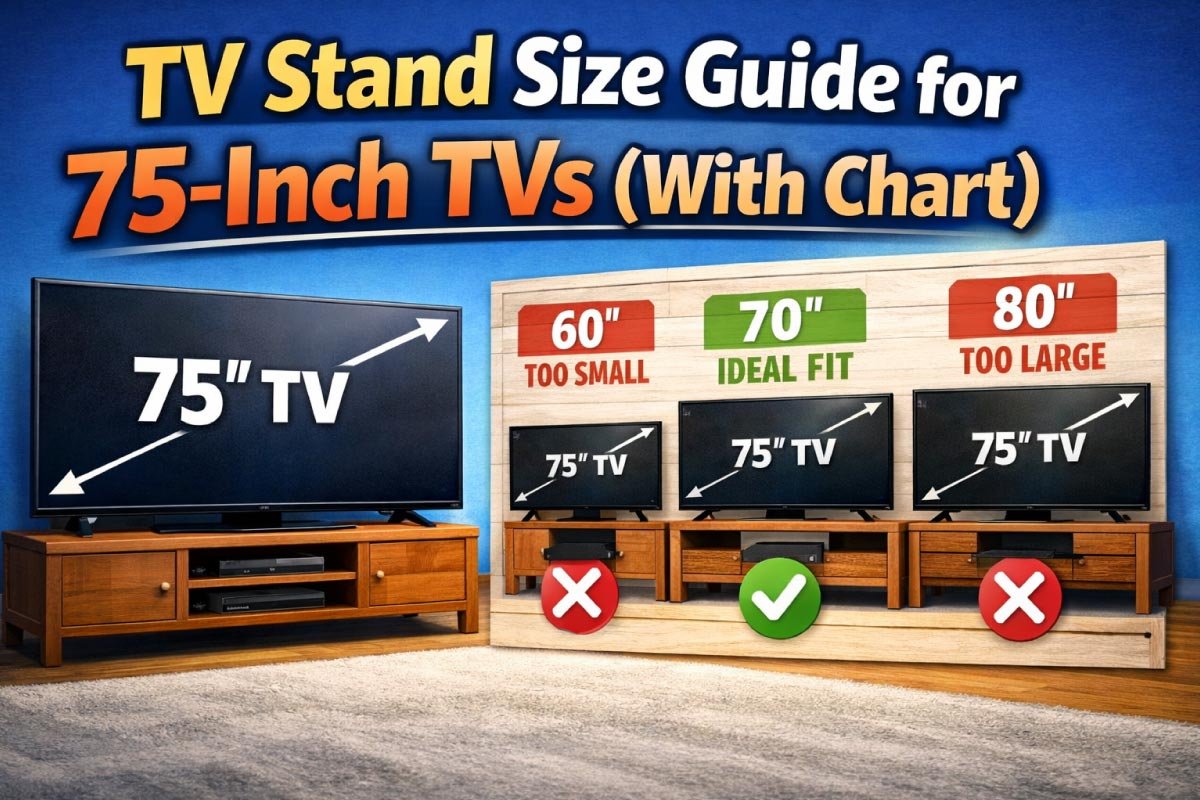
Choosing the right TV stand for a 75‑inch television is more than just picking a piece of furniture that looks nice. It influences your viewing comfort, room aesthetics, safety, and even sound quality. This complete guide walks you through measurements, style tips, height considerations, viewing angles, storage ideas, and recommendations tailored to different room sizes.
Why Size Matters
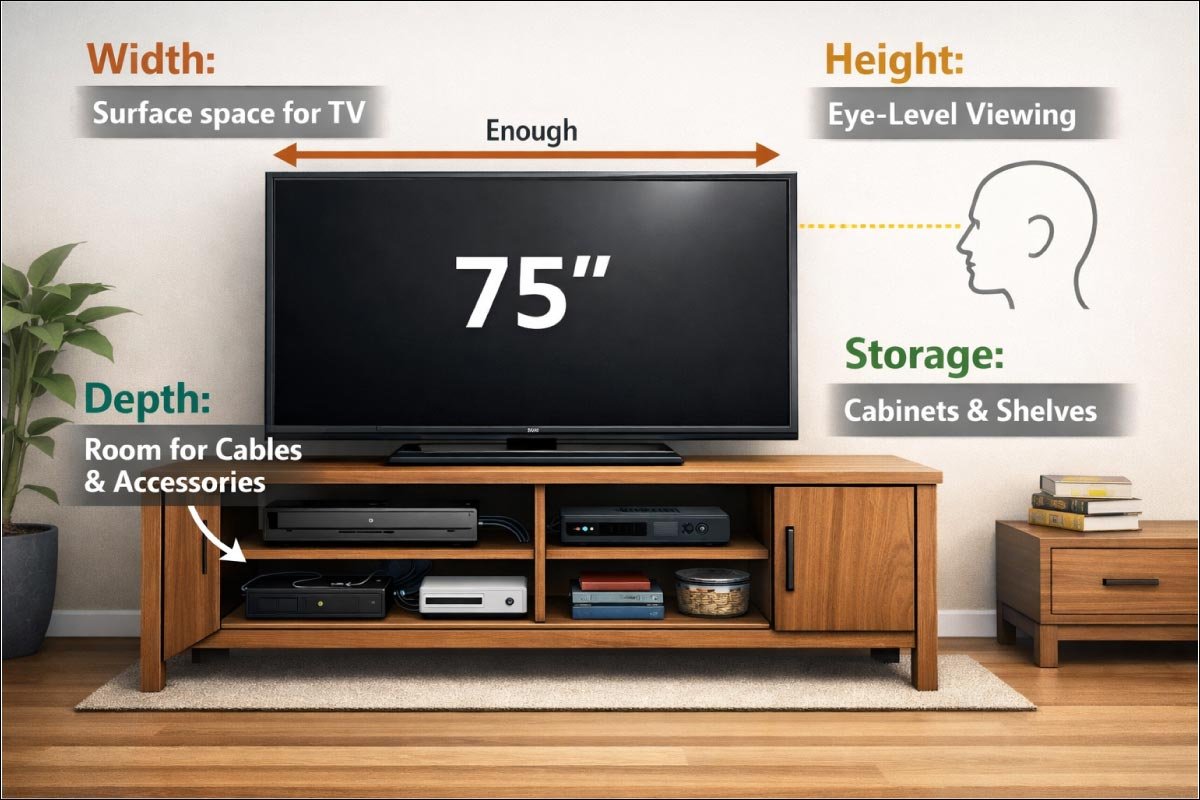
Choosing the right TV stand for a 75‑inch television goes beyond aesthetics. Proper dimensions ensure stability, comfort, and functionality. The stand must accommodate the TV’s width, provide adequate depth for devices, position the screen at eye level, and offer storage for accessories and media components.
-
Width: Enough surface space so the TV doesn’t hang off the edges.
-
Depth: Space for cables, soundbars, and accessories.
-
Height: Proper eye‑level viewing.
-
Storage: Cabinets, shelves, and room for devices.
Understanding TV Dimensions
Understanding your TV’s exact dimensions is essential before selecting a stand. A 75-inch TV’s diagonal measurement doesn’t reflect its full width or height, which vary with bezel and stand. Knowing the width, height, and depth ensures your stand fits perfectly, offers stability, and complements your living space.
| Measurement | Approximate Size for 75″ TV |
|---|---|
| Width | 65–67 inches |
| Height | 37–39 inches (with stand) |
| Depth | 3–4 inches (screen only) |
| Diagonal | 75 inches |
Note: “75‑inch” refers to the diagonal screen length, not width — so actual width is about 65‑67 inches depending on bezel thickness.
Recommended TV Stand Sizes (Width Chart)
Choosing the right TV stand width is key for both safety and style. For a 75-inch TV, the stand should extend beyond the screen to ensure stability and visual balance. This chart helps you select the minimum, recommended, and ideal width, while maximizing storage and overall room layout.
| TV Size | Minimum Stand Width | Recommended Width | Ideal Width Range |
|---|---|---|---|
| 75″ | 70 inches | 75–80 inches | 75–90 inches |
Wider isn’t bad — it just gives you more storage and footprint space.
Height Guidelines (for Optimal Eye Level)
Proper TV height is crucial for comfortable viewing and to prevent neck strain. Ideally, the screen’s center aligns with your eye level while seated. This chart shows recommended stand heights based on average seating heights, helping you choose a 75-inch TV stand that ensures ergonomic viewing and a balanced room setup
| Seating Eye Height | Ideal TV Center Height | Stand Height Range |
|---|---|---|
| 36″ | 36″ | 20–30″ |
| 38″ | 38″ | 22–30″ |
| 40″ | 40″ | 24–32″ |
As a rule, a stand height of 24–30 inches works for most living rooms.
TV Stand Depth & Device Fit Chart
TV stand depth is often overlooked but essential for accommodating your devices and accessories. From soundbars to game consoles, each item requires space to fit comfortably without overhanging. This chart helps you choose a 75-inch TV stand with adequate depth, ensuring functionality, organization, and a clean, balanced look.
| Item | Approx. Depth Needed |
|---|---|
| TV Base / Feet | 10–14 inches |
| Soundbar | 4–6 inches |
| Game Console (e.g., PS5) | 12–15 inches |
| Cable Box | 8–10 inches |
| Media Storage Baskets | 12–15 inches |
If you plan to put devices on the same shelf as the TV, 20 inches of depth is ideal.
Room Placement & Viewing Distance Chart
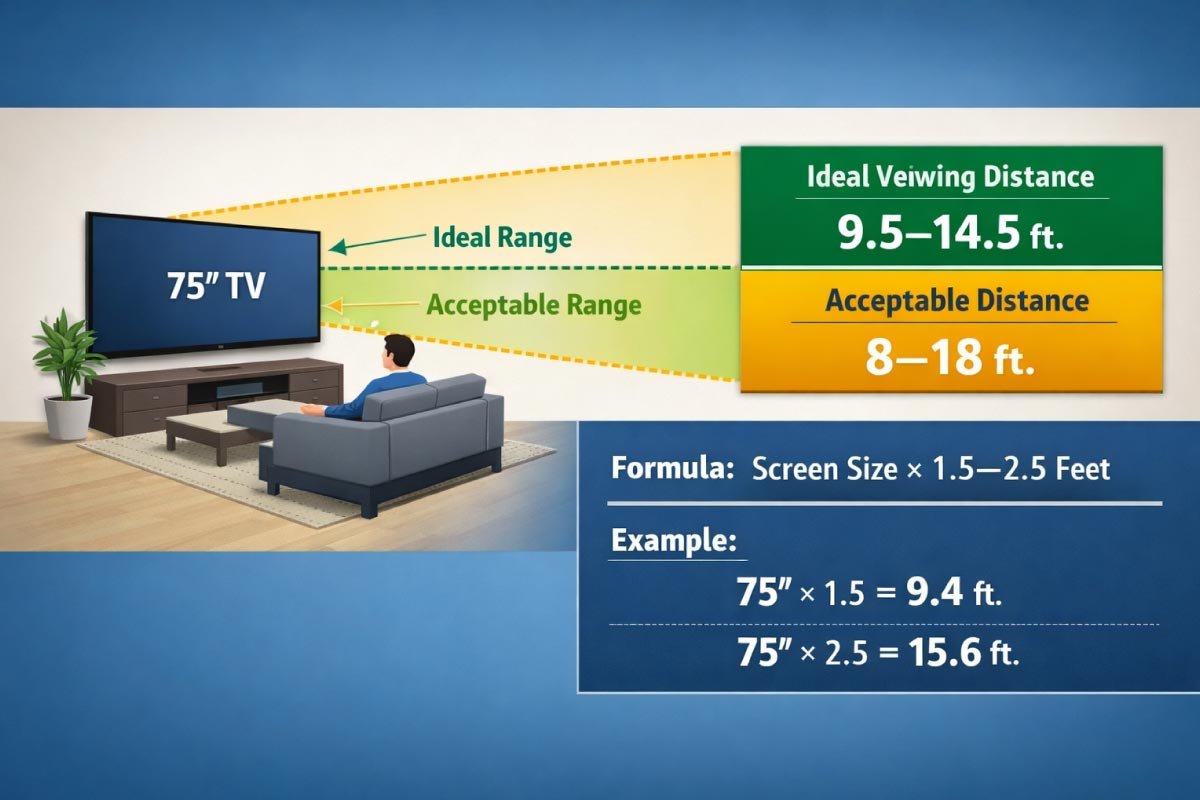
Proper TV placement is key for comfortable viewing and to reduce eye strain. Maintaining the right distance between your 75-inch screen and seating ensures an immersive experience. This chart shows ideal and acceptable viewing ranges, helping you position your TV for both comfort and optimal visual performance.
| TV Size | Ideal Viewing Distance | Acceptable Distance |
|---|---|---|
| 75″ | 9.5–14.5 feet | 8–18 feet |
Formula: Multiply diagonal screen size by 1.5–2.5 to find ideal feet of distance.
Example:
75 inches × 1.5 ≈ 112.5 inches (9.4 feet)
75 inches × 2.5 ≈ 187.5 inches (15.6 feet)
Match Stand Height to Seating Chart
Matching your TV stand height to your sofa ensures a comfortable, strain-free viewing experience. This chart pairs common seat heights with recommended stand heights so the screen center aligns with your eyes. Proper alignment enhances ergonomics, maintains balance in your living room, and creates a seamless, visually pleasing setup.
| Sofa Seat Height | Recommended Stand Height |
|---|---|
| 16–18 inches | 24–26 inches |
| 18–20 inches | 26–28 inches |
| 20–22 inches | 28–30 inches |
The goal: the center of the TV screen should be at eye level when seated.
TV Stand Styles & How They Affect Size
The style of your TV stand impacts both aesthetics and practicality. Different designs—modern, rustic, mid-century, or industrial—affect available surface area, storage options, and overall dimensions. Choosing the right style ensures your TV fits securely while complementing your room’s décor.
1- Low & Wide Modern Stands
Low and wide modern TV stands offer a minimalist aesthetic, emphasizing clean lines and open surfaces. They create a spacious feel, accommodate large TVs, and often include subtle storage solutions. Choosing the right width ensures your 75‑inch TV looks balanced and stylish in the room.
-
Description: Sleek, minimalist, often with flat surfaces.
-
Best for: Modern/Loft living rooms.
-
Size tips: Go 80–90 inches wide for balance.
-
Notes: Great for placing decorative items and media.
2- Tall Cabinets & Console Stands
Tall cabinets and console stands combine TV placement with extra storage, making them ideal for organizing media, books, or decor. Their height adds visual presence but requires careful measurement to keep the screen at eye level, ensuring comfortable viewing while maximizing functional space in your living area.
-
Description: Taller storage with drawers or doors.
-
Best for: Rooms needing extra storage.
-
Size tips: Height may be 30–36 inches — perfect if sofas are taller.
-
Notes: Ensure TV center is still at eye level.
3- Floating / Wall Mounted Stands
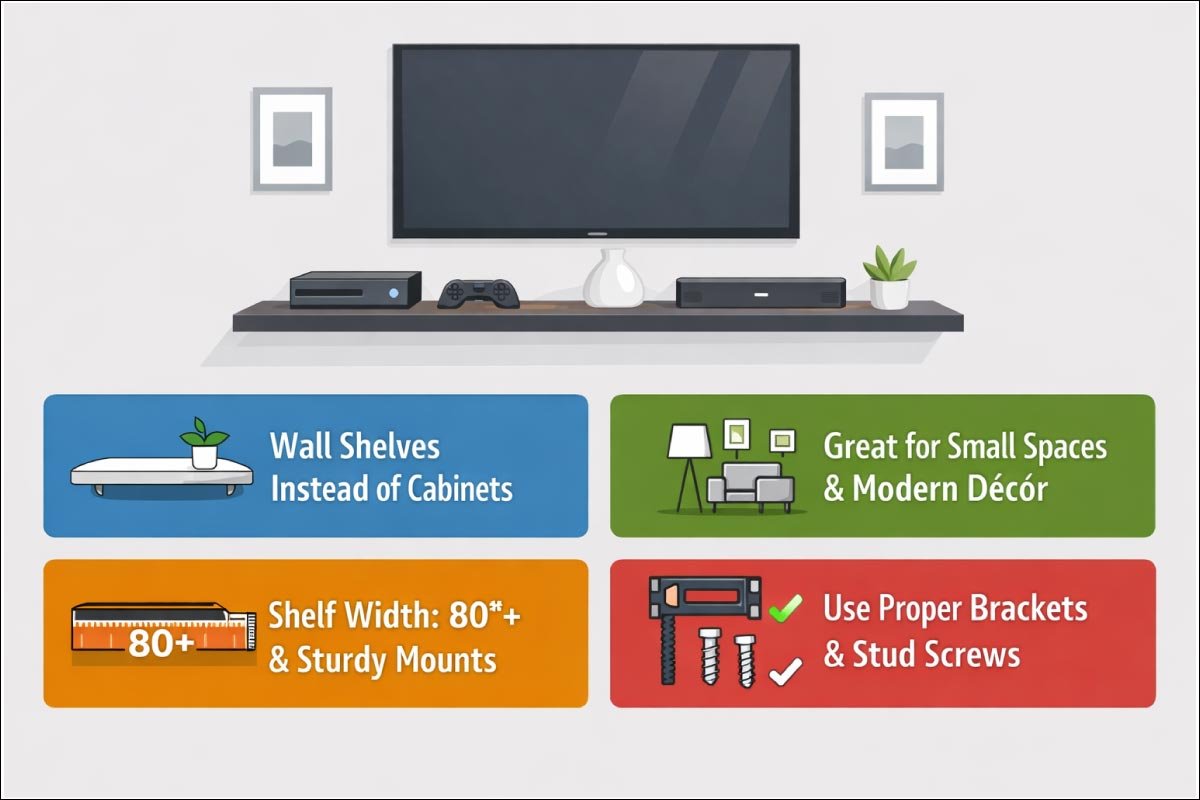
Floating or wall-mounted TV stands save floor space while creating a sleek, modern look. They provide flexibility in height placement, making them ideal for small rooms or minimalist designs. Proper mounting ensures stability, while the right shelf width accommodates large TVs and accessories safely.
-
Description: Wall shelves instead of traditional cabinets.
-
Best for: Small spaces or modern décors.
-
Size tips: Allow shelf width ~80+ inches; support with sturdy mounts.
Don’t rely on stand alone — always mount with proper bracket and stud screws.
4- Corner TV Stands
Corner TV stands are designed to make the most of unused room corners, offering both functionality and space efficiency. Their angled design fits snugly while providing stable support for large TVs. Proper depth ensures devices and cables fit comfortably, making them ideal for small or oddly shaped rooms.
-
Description: Angled to fit snugly in a corner.
-
Best for: Small/odd shaped rooms.
-
Size tips: Width may be smaller (60–75 inches) but depth is key: 20–24 inches.
Discover More:
Placement Tips For Best Viewing Experience
Proper TV stand placement enhances comfort, reduces strain, and optimizes viewing angles. Consider distance from seating, eye-level height, glare from windows, and room layout. Thoughtful positioning ensures your 75‑inch TV delivers a cinematic experience while maintaining an organized and visually appealing living space.
Tip 1: Avoid Glare
Natural light from windows can reflect on a big screen. Avoid placing the TV directly opposite bright windows, or use curtains/blinds.
Tip 2: Safety & Ventilation
Glare can ruin your viewing experience, especially on a large 75‑inch TV. Positioning your stand thoughtfully and managing natural light with curtains or blinds helps maintain clear, vibrant picture quality. Small adjustments in placement can make a big difference in comfort and visual enjoyment.
Tip 3: Wall Clearance
Proper wall clearance ensures your TV stays cool and cables remain organized. Leaving space behind the television promotes airflow, reduces overheating risk, and allows easy access for connections. Even a small gap of a few inches can improve both the safety and longevity of your electronics.
Tip 4: Cable Management
Effective cable management keeps your entertainment area tidy and safe. Selecting a TV stand with built-in holes, grommets, or channels allows you to route power cords, HDMI cables, and other connections neatly. Organized wiring not only looks better but also prevents tangling and accidental damage to your devices.
Example Room Setups
Visualizing your TV and stand within a room helps plan space, traffic flow, and viewing comfort. By considering furniture placement, seating distance, and accessory storage, you can create a functional and stylish setup. These examples illustrate how different stand styles and sizes fit various room layouts.
Living Room Example: Wide Layout
In larger living spaces, choosing a wide TV stand ensures balance and proportion. Proper height and viewing distance enhance comfort, while scale-matched furniture creates a cohesive, cinematic experience. Thoughtful placement and stand dimensions make the room feel inviting, functional, and visually harmonious.
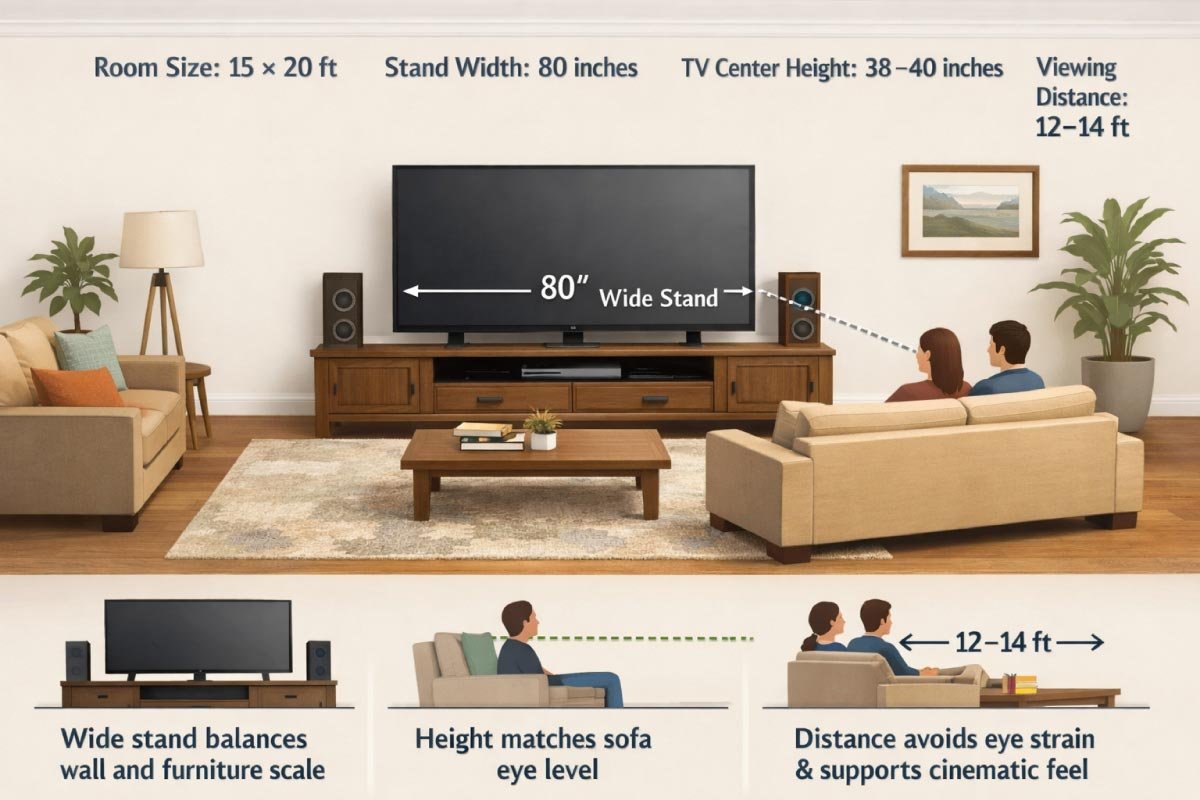
Room Size: 15 × 20 ft
Stand Width: 80 inches
TV Center Height: 38–40 inches
Viewing Distance: 12–14 ft
Why It Works:
-
Wide stand balances wall and furniture scale
-
Height matches sofa eye level
-
Distance avoids eye strain and supports cinematic feel
2- Small Family Room Example
Even in a compact space, proper TV stand selection ensures comfort and style. Matching stand dimensions to room size and sofa height maximizes viewing pleasure while maintaining an open feel. Thoughtful placement prevents crowding, optimizes distance, and creates a cozy yet functional living area for the whole family.
Room Size: 10 × 12 ft
Stand Width: 70–75 inches
Stand Height: 26–28 inches
Viewing Distance: ~9 ft
Why It Works:
-
Compact layout without crowding
-
Lower stand to match shorter sofas
-
Keeps room open and spacious
Final Fit & Finish Checklist
Before purchasing a TV stand for your 75‑inch screen, it’s crucial to evaluate both size and functionality. This checklist helps ensure the stand provides proper support, optimal viewing height, cable management, and ventilation, so your entertainment setup is safe, comfortable, and visually balanced.
-
Will the stand width exceed the TV width?
-
Is the stand depth enough for devices?
-
Does the stand height place the TV center at eye level?
-
Will the stand width exceed the TV width?
-
Is cable management built in or add‑on friendly?
-
Does your room space allow the recommended viewing distance?
-
Are vents/circulation holes present to prevent overheating?
Mount vs. Stand — Quick Decision Guide
Deciding between a TV stand and a wall mount affects style, safety, and functionality. Stands offer storage and decorative appeal, while mounts save space and improve safety. This quick guide compares key features, helping you choose the best setup for your 75-inch TV and living room needs.
| Feature | TV Stand | Wall Mount |
|---|---|---|
| Storage Space | Yes | No (unless shelves added) |
| Height Flexibility | Medium | High |
| Installation Ease | Easy | Moderate/Professional |
| Style Impact | Decorative | Minimalist |
| Safety with Kids/Pets | Needs Anchoring | Higher & Safer |
Pro tip: Even if you use a stand, consider adding a wall mount safety strap so your TV doesn’t tip forward.
Welcome to Size Helper 📌 – your go-to resource for smart sizing solutions! Find accurate furniture dimensions 🛋️, appliance measurements ⚡, sports equipment sizes 🏀, fashion sizing charts 👗, bed & mattress sizes, kitchen cabinet dimensions, TV stand guides, shoe size charts, pillow & bedding sizes, jewelry measurements, bike & gear sizes, baby & kids clothing sizes, and general size guides 📏. Explore now 🔍 to shop, plan, or decorate with confidence!
Frequently Asked Questions
Many readers have similar concerns when choosing a TV stand for a 75‑inch screen. This FAQ section addresses common questions about size, placement, materials, safety, and accessories, helping you make informed decisions to ensure your TV fits securely, looks great, and delivers the best viewing experience.
1- Can a 75″ TV go on a 60“ stand?
Proper fit is essential for safety and aesthetics. Using a stand narrower than your TV creates overhang, increasing the risk of tipping and damaging both the screen and furniture. Always match or exceed the TV width to ensure stability and a balanced appearance.
2- What material is best for a TV stand?
The right material ensures stability, longevity, and style for your TV stand. Solid wood, plywood with veneer, or metal-frame designs provide strong support for large TVs, while lighter options like particle board work only for smaller loads. Material choice also affects aesthetics and room harmony.
3- Do I need to anchor the TV stand to the wall?
Safety is paramount with large TVs. Anchoring the stand prevents tipping accidents, especially in homes with children or pets. Properly secured furniture protects both people and electronics, providing peace of mind while maintaining the stability and integrity of your entertainment setup.
4- Does the soundbar need its own shelf?
Sound bar placement affects both audio quality and aesthetics. Depending on height and clearance, some soundbars can share the TV shelf, while larger models may require a dedicated surface. Ensuring proper spacing prevents obstruction, optimizes sound projection, and maintains a clean, organized entertainment setup.
Summary
Choosing the ideal TV stand for a 75‑inch television involves balancing size, functionality, and style. Considering width, height, depth, viewing distance, and storage ensures both safety and comfort. Thoughtful selection allows your entertainment area to look polished while providing practical support for your TV and accessories.
-
Stand width > TV width for stability.
-
Stand height that puts center screen at seated eye level.
-
Depth for devices — minimum 20″ if you plan accessories.
-
Viewing distance of ~9.5–14.5 feet.
-
Style & storage that blends with décor and daily use.
With the tables in this guide, you can confidently choose a stand that not only fits physically but enhances your viewing experience and room design.

I am Engineer Hassan, a professional engineer with over 15 years of experience in measurements, design accuracy, and furniture, appliance, and home product sizing. Through Size Helper, I provide research-based guides and trending 2026 home design ideas for living rooms, bedrooms, sofas, wall décor, fashion, and sports—helping users make confident, informed decisions. Every guide is written with real expertise, verified data, and a commitment to quality, usability, and style.